Hyrax Demonstration
For this demonstration we’ll walk through a simplified version of a typical machine learning workflow supported by Hyrax.
[ ]:
%%capture
# Install the Hyrax package if not already installed.
# Note: Hyrax has several large dependencies installation can take a couple of minutes.
%pip install hyrax
[1]:
import hyrax
import pooch  # We'll use this to retrieve some example Hyper Suprime Cam data from Zenodo
import numpy as np
Download a sample HSC dataset
[2]:
file_path = pooch.retrieve(
    # DOI for Example HSC dataset
    url="doi:10.5281/zenodo.14498536/hsc_demo_data.zip",
    known_hash="md5:1be05a6b49505054de441a7262a09671",
    fname="example_hsc_new.zip",
    path="../../data",
    processor=pooch.Unzip(extract_dir="."),
)
This dataset is comprised of approximately 993 cutouts from the Hyper Suprime Cam survey. Each cutout includes i, r and g bands and is 8 arcseconds on a side.
Create and configure a Hyrax object
[3]:
h = hyrax.Hyrax()
[2025-07-02 13:26:03,039 hyrax:INFO] Runtime Config read from: /home/drew/code/hyrax/src/hyrax/hyrax_default_config.toml
An instance of the Hyrax class will be used through out this demo. When working in a notebook, this is how you’ll give instructions to Hyrax.
[4]:
# Specify the location of the data to use for training
h.config["general"]["data_dir"] = "../../data/hsc_8asec_1000"

# Specify the dataset class that represents the data
h.config["data_set"]["name"] = "HSCDataSet"
h.config["data_set"]["train_size"] = 0.8
h.config["data_set"]["validate_size"] = 0.2
h.config["data_set"]["test_size"] = 0.0

# Select the model to use for training
h.config["model"]["name"] = "HyraxAutoencoder"

# Set the number of epochs and batch size for training.
h.config["train"]["epochs"] = 20
h.config["data_loader"]["batch_size"] = 32
The default configuration needs a few tweaks to work for this demo. We’ve updated the location of our sample data, and specified which model we want to train.
In a notebook, the configuration can be modified like a dictionary by editing the h.config attribute of the hyrax instance.
Train a model
[5]:
h.train()
[2025-07-02 13:26:17,967 hyrax.data_sets.hsc_data_set:INFO] Checking file dimensions to determine standard cutout size...
[2025-07-02 13:26:17,970 hyrax.data_sets.fits_image_dataset:INFO] FitsImageDataSet has 993 objects
[2025-07-02 13:26:17,987 hyrax.data_sets.hsc_data_set:INFO] Processed 993 objects for pruning
[2025-07-02 13:26:17,988 hyrax.data_sets.fits_image_dataset:INFO] Preloading FitsImageDataSet cache...
[2025-07-02 13:26:18,511 hyrax.models.model_registry:INFO] Using criterion: torch.nn.CrossEntropyLoss with default arguments.
2025-07-02 13:26:18,588 ignite.distributed.auto.auto_dataloader INFO: Use data loader kwargs for dataset '<hyrax.data_sets.hsc':
        {'sampler': <hyrax.pytorch_ignite.SubsetSequentialSampler object at 0x76a8321ee630>, 'batch_size': 32, 'shuffle': False, 'pin_memory': True}
2025-07-02 13:26:18,591 ignite.distributed.auto.auto_dataloader INFO: Use data loader kwargs for dataset '<hyrax.data_sets.hsc':
        {'sampler': <hyrax.pytorch_ignite.SubsetSequentialSampler object at 0x76a73c708800>, 'batch_size': 32, 'shuffle': False, 'pin_memory': True}
/home/drew/miniconda3/envs/hyrax/lib/python3.12/site-packages/ignite/handlers/tqdm_logger.py:127: TqdmExperimentalWarning: Using `tqdm.autonotebook.tqdm` in notebook mode. Use `tqdm.tqdm` instead to force console mode (e.g. in jupyter console)
  from tqdm.autonotebook import tqdm
2025/07/02 13:26:20 INFO mlflow.system_metrics.system_metrics_monitor: Started monitoring system metrics.
[2025-07-02 13:26:20,792 hyrax.pytorch_ignite:INFO] Training model on device: cuda
[2025-07-02 13:26:32,000 hyrax.data_sets.fits_image_dataset:INFO] Processed 992 objects
[2025-07-02 13:26:48,993 hyrax.pytorch_ignite:INFO] Total training time: 28.20[s]
[2025-07-02 13:26:48,995 hyrax.pytorch_ignite:INFO] Latest checkpoint saved as: /home/drew/code/hyrax/docs/pre_executed/results/20250702-132617-train-qNr6/checkpoint_epoch_20.pt
[2025-07-02 13:26:48,995 hyrax.pytorch_ignite:INFO] Best metric checkpoint saved as: /home/drew/code/hyrax/docs/pre_executed/results/20250702-132617-train-qNr6/checkpoint_16_loss=-200.4559.pt
2025/07/02 13:26:48 INFO mlflow.system_metrics.system_metrics_monitor: Stopping system metrics monitoring...
2025/07/02 13:26:49 INFO mlflow.system_metrics.system_metrics_monitor: Successfully terminated system metrics monitoring!
[2025-07-02 13:26:49,017 hyrax.train:INFO] Finished Training
[2025-07-02 13:26:49,289 hyrax.model_exporters:INFO] Exported model to ONNX format: /home/drew/code/hyrax/docs/pre_executed/results/20250702-132617-train-qNr6/example_model_opset_20.onnx
When we call h.train() to train the model there’s a lot going on under the hood:
The model is automatically loaded onto the fastest hardware available.
A dataset is instantiated and configured to load batches of data to the same hardware.
A timestamped directory is created under the configured results directory.
The configuration becomes immutable and a copy is saved for reproducibility.
Model and system metrics are logged for review in both TensorBoard and MLFlow.
Checkpoints are saved automatically.
Model weights are saved in PyTorch and ONNX formats.
Run inference
[6]:
# Update the data set splits to be 100% test data
h.config["data_set"]["test_size"] = 1.0
h.config["data_set"]["train_size"] = 0.0
h.config["data_set"]["validate_size"] = 0.0

# Increase batch size for faster inference
h.config["data_loader"]["batch_size"] = 512

# Run inference
h.infer()
[2025-07-02 13:28:20,171 hyrax.data_sets.hsc_data_set:INFO] Checking file dimensions to determine standard cutout size...
[2025-07-02 13:28:20,175 hyrax.data_sets.fits_image_dataset:INFO] FitsImageDataSet has 993 objects
[2025-07-02 13:28:20,193 hyrax.data_sets.hsc_data_set:INFO] Processed 993 objects for pruning
[2025-07-02 13:28:20,194 hyrax.data_sets.fits_image_dataset:INFO] Preloading FitsImageDataSet cache...
[2025-07-02 13:28:20,668 hyrax.models.model_registry:INFO] Using criterion: torch.nn.CrossEntropyLoss with default arguments.
[2025-07-02 13:28:20,671 hyrax.verbs.infer:INFO] data set has length 993
2025-07-02 13:28:20,675 ignite.distributed.auto.auto_dataloader INFO: Use data loader kwargs for dataset '<hyrax.data_sets.hsc':
        {'sampler': None, 'batch_size': 512, 'shuffle': False, 'pin_memory': True}
[2025-07-02 13:28:20,808 hyrax.verbs.infer:INFO] Saving inference results at: /home/drew/code/hyrax/docs/pre_executed/results/20250702-132820-infer-1haN
[2025-07-02 13:28:21,401 hyrax.pytorch_ignite:INFO] Evaluating model on device: cuda
[2025-07-02 13:28:21,407 hyrax.pytorch_ignite:INFO] Total epochs: 1
[2025-07-02 13:28:35,102 hyrax.data_sets.fits_image_dataset:INFO] Processed 992 objects
[2025-07-02 13:28:36,030 hyrax.pytorch_ignite:INFO] Total evaluation time: 14.63[s]
[2025-07-02 13:28:36,145 hyrax.verbs.infer:INFO] Inference Complete.
[2025-07-02 13:28:36,218 hyrax.data_sets.hsc_data_set:INFO] Checking file dimensions to determine standard cutout size...
[2025-07-02 13:28:36,221 hyrax.data_sets.fits_image_dataset:INFO] FitsImageDataSet has 993 objects
[2025-07-02 13:28:36,237 hyrax.data_sets.hsc_data_set:INFO] Processed 993 objects for pruning
[6]:
<hyrax.data_sets.inference_dataset.InferenceDataSet at 0x76a73f480d40>
Now we can use the trained model weights to run inference. By default, Hyrax will use the weights of the last successfully trained model. Different weights can be specified in the configuration.
Before inference we make a small update to the dataset splits by setting test_size to 100% and the other splits to 0%. We also increase the batch size in order to make better use of the available GPU memory.
Finally we run inference over the dataset using the trained model weights with h.infer(). As with training, Hyrax is doing a lot behind the scenes on behalf of the user including:
Identifying and using the most performant hardware available.
Creating a new timestamped directory for output.
Saving a copy of the configuration for reproducibility.
Storing the results of inference in batched Numpy files.
Examine an embedding
[7]:
h.umap()
[2025-07-02 13:28:59,387 hyrax.data_sets.inference_dataset:INFO] Using most recent results dir /home/drew/code/hyrax/docs/pre_executed/results/20250702-132820-infer-1haN for lookup. Use the [results] inference_dir config to set a directory or pass it to this verb.
[2025-07-02 13:28:59,456 hyrax.data_sets.hsc_data_set:INFO] Checking file dimensions to determine standard cutout size...
[2025-07-02 13:28:59,460 hyrax.data_sets.fits_image_dataset:INFO] FitsImageDataSet has 993 objects
[2025-07-02 13:28:59,478 hyrax.data_sets.hsc_data_set:INFO] Processed 993 objects for pruning
[2025-07-02 13:28:59,480 hyrax.verbs.umap:INFO] Saving UMAP results to /home/drew/code/hyrax/docs/pre_executed/results/20250702-132859-umap-zaFQ
[2025-07-02 13:28:59,794 hyrax.verbs.umap:INFO] Fitting the UMAP
[2025-07-02 13:29:06,246 hyrax.verbs.umap:INFO] Saving fitted UMAP Reducer
[2025-07-02 13:29:09,493 hyrax.verbs.umap:INFO] Finished transforming all data through UMAP
[2025-07-02 13:29:09,559 hyrax.data_sets.hsc_data_set:INFO] Checking file dimensions to determine standard cutout size...
[2025-07-02 13:29:09,562 hyrax.data_sets.fits_image_dataset:INFO] FitsImageDataSet has 993 objects
[2025-07-02 13:29:09,579 hyrax.data_sets.hsc_data_set:INFO] Processed 993 objects for pruning
[7]:
<hyrax.data_sets.inference_dataset.InferenceDataSet at 0x76a810b8d010>
Here h.umap() will use the output of the latest inference operation to inform a UMAP fitter and create a lower dimensional representation of the inference results.
Hyrax ensures that file output of the inference step allows for efficient fitting and transformation with UMAP and all of the data plumbing to read from inference and write results is taken care of automatically.
Interactive visualization
[21]:
h.config["visualize"]["fields"] = ["ra", "dec"]
viz = h.visualize(width=1000, height=1000)
[2025-07-02 20:41:03,225 hyrax.data_sets.inference_dataset:INFO] Using most recent results dir /home/drew/code/hyrax/docs/pre_executed/results/20250702-132859-umap-zaFQ for lookup. Use the [results] inference_dir config to set a directory or pass it to this verb.
[2025-07-02 20:41:03,291 hyrax.data_sets.hsc_data_set:INFO] Checking file dimensions to determine standard cutout size...
[2025-07-02 20:41:03,293 hyrax.data_sets.fits_image_dataset:INFO] FitsImageDataSet has 993 objects
[2025-07-02 20:41:03,308 hyrax.data_sets.hsc_data_set:INFO] Processed 993 objects for pruning


The Hyrax visualization tooling utilizes Holoviews, Datashader as well as an efficient tree structure to be able to display millions of points. It allows for panning, zooming as well as lasso and box selections. When selecting points, the resulting object ids are displayed are displayed in the associated table.
While this is an early version of interactive visualization, it has been scaled up to millions of data points. The next steps for this tooling will be to support deeper interactivity, namely:
Automatically displaying the object selected in the table
Leveraging a vector db to identify similar objects
Supporting three dimensional UMAP output
This visualization runs in a notebook but when rendered to HTML (for demonstration or documentation) the server backing the interactive visual isn’t packaged with the rendering. If the cell above was run locally, the resulting UI would look similar to the following screen shot.

Create a vector database
By calling h.save_to_database(), we can populate a vector database for efficient similarity searching of the inference results.
[9]:
h.save_to_database()
[2025-07-02 13:29:53,480 hyrax.data_sets.hsc_data_set:INFO] Checking file dimensions to determine standard cutout size...
[2025-07-02 13:29:53,483 hyrax.data_sets.fits_image_dataset:INFO] FitsImageDataSet has 993 objects
[2025-07-02 13:29:53,500 hyrax.data_sets.hsc_data_set:INFO] Processed 993 objects for pruning
[2025-07-02 13:29:53,719 hyrax.verbs.save_to_database:INFO] Number of inference result batches to index: 2.
100%|██████████| 2/2 [00:00<00:00,  9.21it/s]
Perform a similarity search
To search for objects that are similar to a given object, we can exploit the efficiency of the vector database that was just created. Here, we establish a connection to the ChromaDB database that was just created using h.database_connection().
[10]:
db = h.database_connection()
With an object id, we can search for k nearest neighbors. In this example, we provide an id for an object in the database and request the 5 nearest neighbors in order of increasing distance.
Note: Because the randomly selected object id is in the database the closest “neighbor” is the object itself. Thus the nearest neighbor that is not the original object, is the second element in the returned list.
[50]:
search_object_id = "37498028021538822"

search_results = db.search_by_id(search_object_id, k=5)

for k, v in search_results.items():
    print(f"Results for ID {k}:\n{v}")
Results for ID 37498028021538822:
['37498028021538822', '36429036431359541', '36434409435448258', '38536375020050212', '36424921852690051']
Display the objects
Let’s check that the nearest neighbor seems reasonable. We’ll plot the original object, and then the nearest neighbors for visual comparison. To plot the images we’ll need to get some information from our dataset.
Using h.prepare() we get an instance of the original HSC dataset class, and use that to get the list of object ids.
[ ]:
hsc_dataset = h.prepare()
all_ids = list(hsc_dataset.ids())
[2025-07-02 13:30:04,716 hyrax.data_sets.hsc_data_set:INFO] Checking file dimensions to determine standard cutout size...
[2025-07-02 13:30:04,719 hyrax.data_sets.fits_image_dataset:INFO] FitsImageDataSet has 993 objects
[2025-07-02 13:30:04,739 hyrax.data_sets.hsc_data_set:INFO] Processed 993 objects for pruning
[2025-07-02 13:30:04,741 hyrax.data_sets.fits_image_dataset:INFO] Preloading FitsImageDataSet cache...
[2025-07-02 13:30:04,743 hyrax.prepare:INFO] Finished Prepare
[2025-07-02 13:30:17,844 hyrax.data_sets.fits_image_dataset:INFO] Processed 992 objects
We can use the nearest neighbor ids returned from the vector database search to get the original images from the hsc_dataset and then plot those for comparison.
[41]:
import matplotlib.pyplot as plt
from matplotlib.colors import LogNorm

fig, axes = plt.subplots(3, 5, figsize=(25, 5 * 3))

for ni, r in enumerate(search_results[search_object_id]):
    indx = all_ids.index(r)  # Get the index of the object in the dataset
    data = hsc_dataset[indx].numpy()  # Retrieve the data for the object - a (3, 96, 96) numpy array
    data = (data - np.min(data)) / (np.max(data) - np.min(data))  # Normalize the data

    for i in range(3):
        axes[i, ni].imshow(data[i], origin="lower", norm=LogNorm(), cmap="Greys")

        if i == 0:
            if ni == 0:
                axes[i, ni].set_title(f"Original search object\nId: {search_object_id}, Indx: {indx}")
            else:
                axes[i, ni].set_title(f"Neighbor {ni}\nId: {r}, Indx: {indx}")

        if ni == 0:
            axes[i, ni].set_ylabel(f"Band {i + 1}")
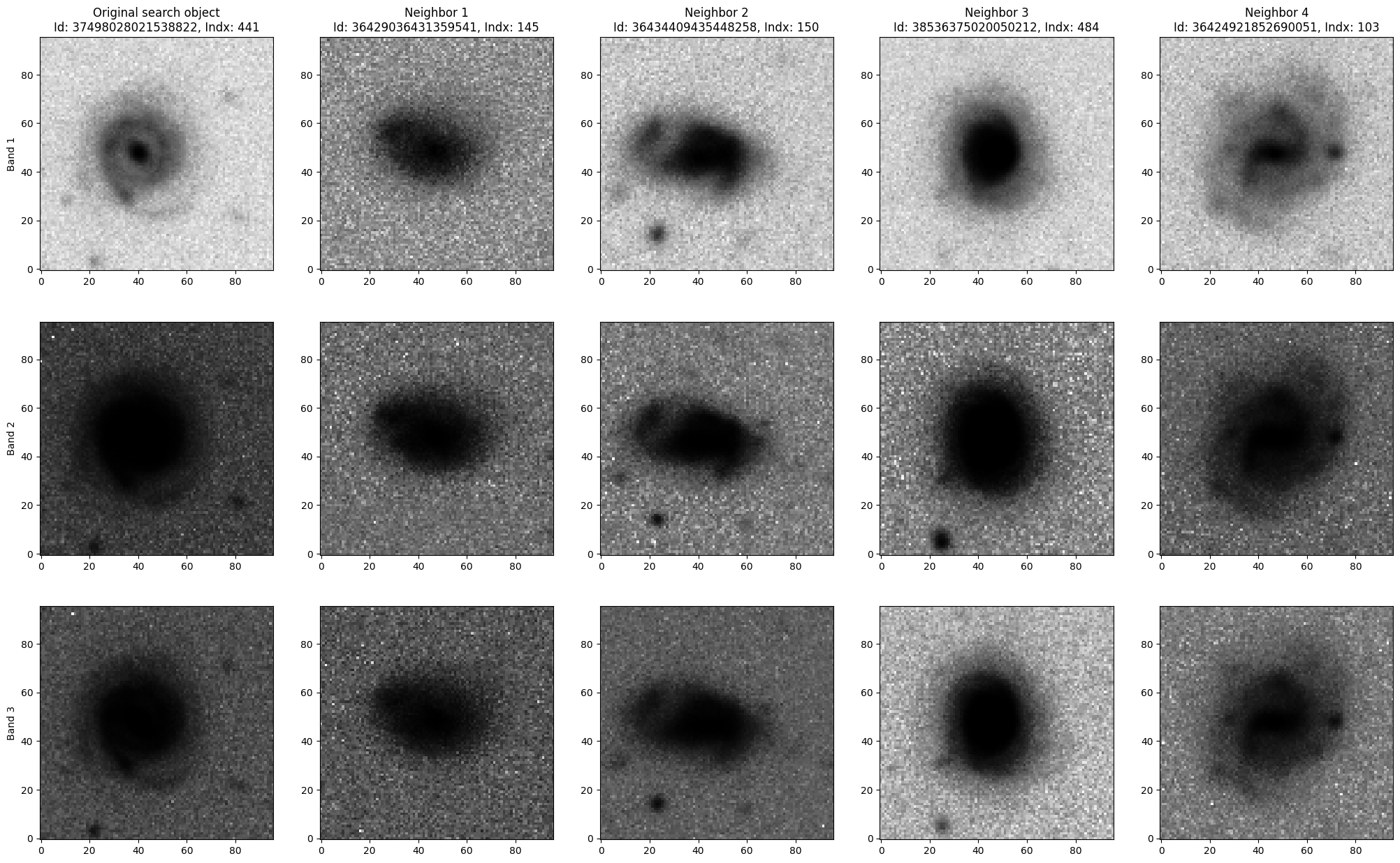
In the left column are three bands of the original image that we used for similarity search. The remaining 4 columns are the first few nearest neighbors.