Using UMAP to Reduce Inference Output#
UMAP (Uniform Manifold Approximation and Projection) is a dimensionality-reduction algorithm that projects high-dimensional data into 2 or 3 dimensions while preserving local structure. This makes it ideal for visualizing the latent space learned by an unsupervised model.
In this notebook we will:
Train a simple autoencoder on random data.
Run inference to obtain latent-space representations.
Apply UMAP to reduce those representations to 2D.
Load and plot the UMAP output.
Show how to switch to 3D output.
1. Setup#
Create a Hyrax instance and configure it to use the built-in HyraxAutoencoder model with the HyraxRandomDataset. The random dataset lets us run the full pipeline quickly without downloading real data.
[1]:
from hyrax import Hyrax

h = Hyrax()
[2]:
# Use an autoencoder (unsupervised) so inference produces a latent vector.
h.config["model"]["name"] = "HyraxAutoencoder"

# Point at the random dataset — no download required.
data_request = {
    "train": {
        "data": {
            "dataset_class": "HyraxRandomDataset",
            "data_location": ".",
            "fields": ["image"],
            "primary_id_field": "object_id",
            "split_fraction": 1.0,
        },
    },
    "infer": {
        "data": {
            "dataset_class": "HyraxRandomDataset",
            "data_location": ".",
            "fields": ["image"],
            "primary_id_field": "object_id",
        },
    },
}
h.set_config("data_request", data_request)

# Train for just 1 epoch to keep things fast.
h.config["train"]["epochs"] = 1
[2026-03-27 12:57:12,976 hyrax.config_utils:WARNING] Runtime config contains key or section 'data_request' which has no default defined. All configuration keys and sections must be defined in /Users/drew/code/hyrax/src/hyrax/hyrax_default_config.toml
2. Train and Infer#
Train the autoencoder and then run inference to produce latent-space representations for every item in the dataset.
[ ]:
model = h.train()
inference_results = h.infer()
3. Run UMAP (2D)#
By default Hyrax reduces to 2 components (n_components = 2). Calling h.umap() fits a UMAP model on a sample of the inference output, then transforms the entire dataset.
[5]:
umap_results = h.umap()
[2026-03-27 12:57:27,307 hyrax.verbs.umap:INFO] Saving UMAP results to /Users/drew/code/hyrax/docs/notebooks/results/20260327-125727-umap-f4yX
[2026-03-27 12:57:27,361 hyrax.verbs.umap:INFO] Fitting the UMAP
[2026-03-27 12:57:31,786 hyrax.verbs.umap:INFO] Saving fitted UMAP Reducer
[2026-03-27T19:57:33Z WARN  lance::dataset::write::insert] No existing dataset at /Users/drew/code/hyrax/docs/notebooks/results/20260327-125727-umap-f4yX/lance_db/results.lance, it will be created
[2026-03-27 12:57:33,594 hyrax.datasets.result_dataset:INFO] Optimizing Lance table after 1 batches
[2026-03-27 12:57:33,595 hyrax.datasets.result_dataset:INFO] Lance table optimization complete
[2026-03-27 12:57:33,595 hyrax.verbs.umap:INFO] Finished transforming all data through UMAP
h.umap() returns a ResultDataset that you can index directly. Each element is a NumPy array with shape (n_components,).
[6]:
import numpy as np

# Stack all UMAP embeddings into a single array.
embeddings = np.array([umap_results[i] for i in range(len(umap_results))])
print(f"Shape: {embeddings.shape}  (samples × components)")
Shape: (100, 2) (samples × components)
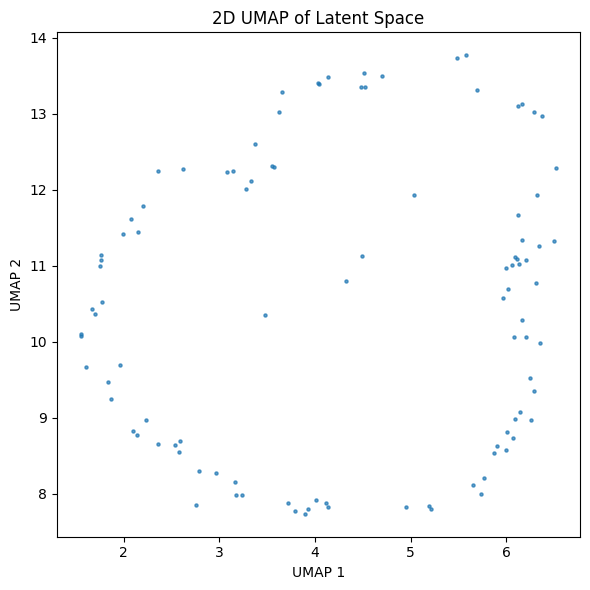
4. Plot the 2D Embedding#
A quick scatter plot of the two UMAP dimensions.
[7]:
import matplotlib.pyplot as plt

fig, ax = plt.subplots(figsize=(6, 6))
ax.scatter(embeddings[:, 0], embeddings[:, 1], s=5, alpha=0.7)
ax.set_xlabel("UMAP 1")
ax.set_ylabel("UMAP 2")
ax.set_title("2D UMAP of Latent Space")
plt.tight_layout()
plt.show()
5. Switch to 3D#
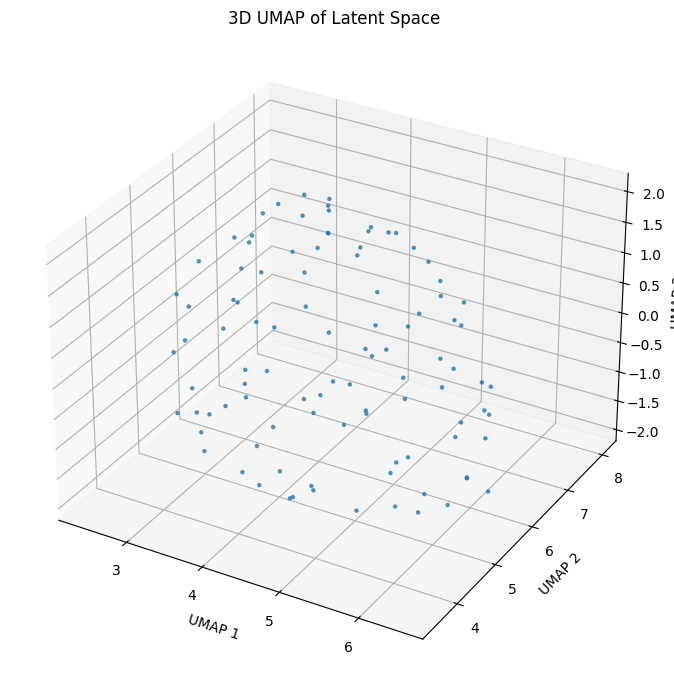
To produce a 3-dimensional embedding instead, set n_components to 3 before calling h.umap() again.
[8]:
h.config["umap"]["UMAP"]["n_components"] = 3
umap_results_3d = h.umap()
[2026-03-27 12:57:33,927 hyrax.verbs.umap:INFO] Saving UMAP results to /Users/drew/code/hyrax/docs/notebooks/results/20260327-125733-umap-WJk5
[2026-03-27 12:57:33,931 hyrax.verbs.umap:INFO] Fitting the UMAP
[2026-03-27 12:57:34,018 hyrax.verbs.umap:INFO] Saving fitted UMAP Reducer
[2026-03-27T19:57:34Z WARN  lance::dataset::write::insert] No existing dataset at /Users/drew/code/hyrax/docs/notebooks/results/20260327-125733-umap-WJk5/lance_db/results.lance, it will be created
[2026-03-27 12:57:34,320 hyrax.datasets.result_dataset:INFO] Optimizing Lance table after 1 batches
[2026-03-27 12:57:34,321 hyrax.datasets.result_dataset:INFO] Lance table optimization complete
[2026-03-27 12:57:34,321 hyrax.verbs.umap:INFO] Finished transforming all data through UMAP
[9]:
embeddings_3d = np.array([umap_results_3d[i] for i in range(len(umap_results_3d))])
print(f"Shape: {embeddings_3d.shape}  (samples × components)")

fig = plt.figure(figsize=(7, 7))
ax = fig.add_subplot(111, projection="3d")
ax.scatter(embeddings_3d[:, 0], embeddings_3d[:, 1], embeddings_3d[:, 2], s=5, alpha=0.7)
ax.set_xlabel("UMAP 1")
ax.set_ylabel("UMAP 2")
ax.set_zlabel("UMAP 3")
ax.set_title("3D UMAP of Latent Space")
plt.tight_layout()
plt.show()
Shape: (100, 3) (samples × components)
Key Configuration Options#
All UMAP settings live under the [umap] section of the Hyrax config. The most commonly adjusted parameters are:
Config key |
Default |
Description |
|---|---|---|
|
2 |
Number of output dimensions (2 or 3). |
|
15 |
Balances local vs. global structure. |
|
1024 |
Number of points used to fit the UMAP model. |
|
false |
Use multiprocessing during the transform step. |
See the UMAP documentation for the full list of parameters you can pass under umap.UMAP.