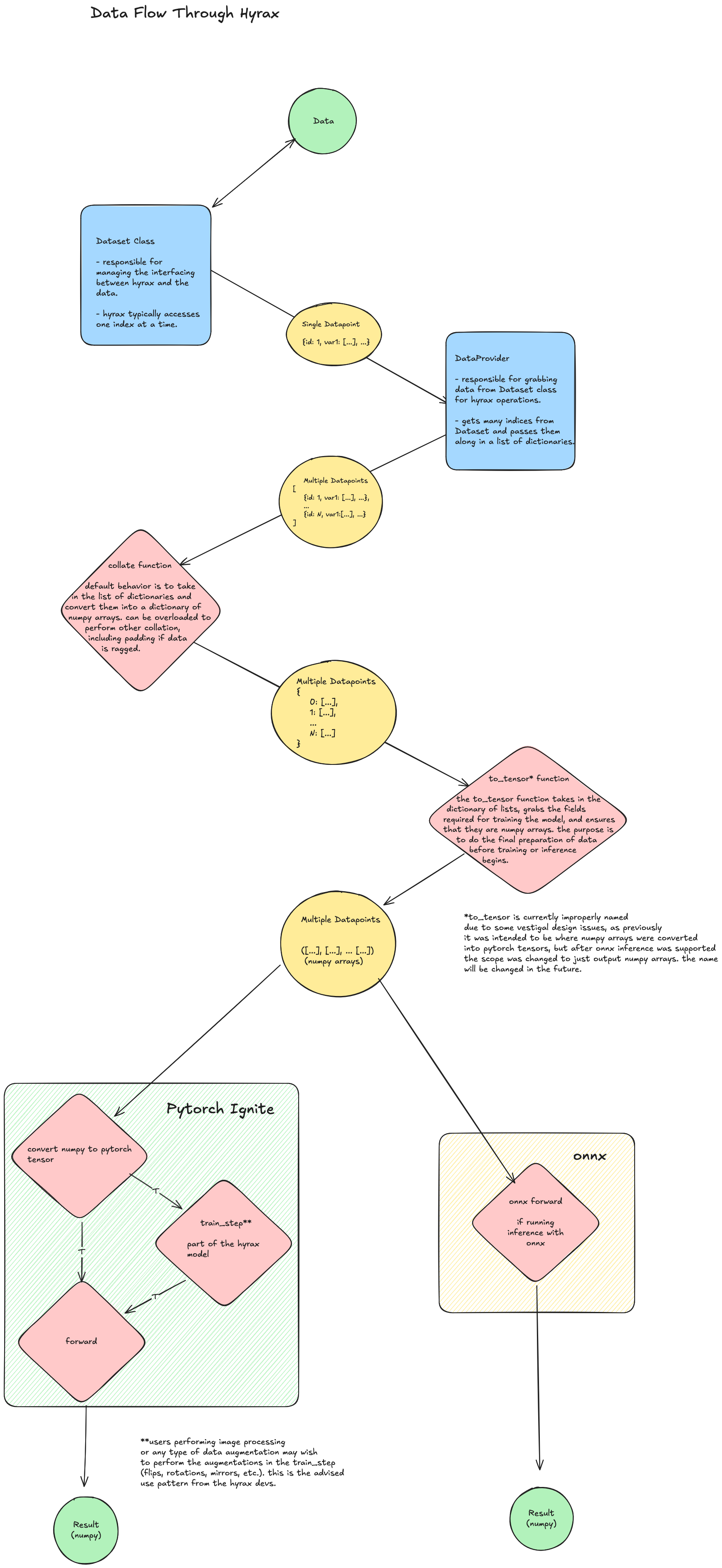
Data Flow Through Hyrax#
Accessing Data on Disk#
Hyrax uses Dataset and DataProvider classes as the interface between
data on disk and PyTorch. The dataset class reference
covers how to write your own Dataset.
Datasets are the direct interface between the Hyrax ecosystem and the
underlying data. A dataset is responsible for handling data on a per-item level
(managing specific data types, labels, and other metadata) via get_<field>(idx)
methods. The DataProvider wraps one or more datasets, handles batching and
collation, and passes data onward toward training or inference. This separation
of concerns allows great flexibility in how data is handled and processed.
Dataset and Field-Level collate Functions#
The collate function combines a batch of individual data items into a
single batch, producing a dictionary of numpy arrays.
By default, Hyrax builds this function automatically by stacking each
field’s values into a numpy array using np.stack. If your data has
non-uniform shapes (e.g. variable-length arrays), you can override the
default behavior for specific fields by defining a collate_<field_name>
function — Hyrax will use it for that field and handle the rest automatically.
You can also define a custom collate function to replace the entire
default behavior, though field-level overrides are usually simpler. Note
that defining both at once will cause an error.
For a hands-on example, see the custom collation notebook.
The prepare_inputs Function#
The prepare_inputs static method on the model class is responsible for
converting the collated batch dictionary into the format the model expects –
typically a tuple of numpy arrays (e.g. (images, labels)). This is the last
step where the user can control how data is transformed before it reaches the
model. See the custom prepare_inputs notebook
for examples, or the model class reference for
the method signature.
Note
prepare_inputs should return numpy arrays, not PyTorch tensors.
Hyrax handles the numpy-to-tensor conversion and device placement
automatically in the training and inference engines.
Note
The older function name to_tensor is deprecated but still supported for backward compatibility.
Please use prepare_inputs in new code.
Training and Inference Pipelines#
After prepare_inputs, data follows one of two paths:
Training — Hyrax converts the numpy arrays to PyTorch tensors, moves them
to the target device (CPU/GPU), and passes them to the model’s train_batch
method via a PyTorch Ignite engine. The model processes the data, computes a
loss, and returns a dictionary of metrics (which must include a "loss" key).
Validation and testing follow the same pattern using validate_batch and
test_batch respectively.
Inference — The same conversion pipeline applies: numpy arrays become
tensors on the target device, and the model’s infer_batch method is called.
The output tensors are converted back to numpy arrays and written to disk in
Lance format. For production deployments without PyTorch, models can be
exported to ONNX and run via the engine verb.
Data Format Summary#
Stage |
Format |
|---|---|
|
Single item: numpy array, scalar, or string |
Before |
List of nested dict. Each item: |
After |
Dict of numpy arrays: |
After |
Tuple of numpy arrays (or single |
Inside model methods |
Tuple of |
Inference output (saved to disk) |
Numpy arrays in Lance format |
Data Flow Diagram#