Result data in Hyrax#
Hyrax verbs like infer and reduce_dimensions return results as instances of ResultDataset, a convenience layer over the underlying lance file format stored on disk.
This notebook follows the Getting Started notebook, training a HyraxCNN model on CIFAR-10 data, then explores how to work directly with inference results.
Note:
lanceis a modern file format designed for ML workflows, supporting efficient writes and both sequential and random access reads.
As in the Getting Started notebook, we’ll train and predict with a model. Instead of plotting a confusion matrix, we’ll explore results on a per-sample level.
We’ll reuse the same config from Getting Started, stored in a file:
[model]
name = "HyraxCNN"

[data_request.train.data]
dataset_class = "HyraxCifarDataset"
data_location = "./data"
fields = ["image", "label"]
primary_id_field = "object_id"

[data_request.infer.data]
dataset_class = "HyraxCifarDataset"
data_location = "./data"
fields = ["image", "object_id"]
primary_id_field = "object_id"

[data_request.infer.data.dataset_config.HyraxCifarDataset]
use_training_data = false
[ ]:
from hyrax import Hyrax

h = Hyrax(config_file="./getting_started_config.toml")
model = h.train()
inference_results = h.infer()
Working with ResultDataset#
inference_results is an instance of Hyrax’s ResultDataset. You can index into it directly, like a list — the returned data is a NumPy array.
[ ]:
index_of_interest = 43
print(f"Type of inference_results: {type(inference_results)}")
print(f"Example output: {inference_results[index_of_interest]}")
print(f"Data type of the result: {type(inference_results[index_of_interest])}")
Class type of the inference results: <class 'hyrax.datasets.result_dataset.ResultDataset'>
Example output: [-0.23138967 -1.1730404   1.1226165   1.2048769   1.5255185   0.15330645
  3.2643142  -0.40478998 -1.8166362  -1.0757787 ]
Data type of the result: <class 'numpy.ndarray'>
The ResultDataset object exposes two methods for direct access to data:
get_object_id(idx)— returns the unique ID of the original input data sample.get_data(idx)— returns the result of operating on the input data, i.e. the prediction fromh.infer().
[ ]:
index_of_interest = 43
obj_id = inference_results.get_object_id(index_of_interest)
data = inference_results.get_data(index_of_interest)
print(f"Object ID: {obj_id}, type: {type(obj_id)}")
print(f"Prediction: {data}, type: {type(data)}")
Object_id: 00043 type: <class 'str'>
Prediction: [-0.23138967 -1.1730404   1.1226165   1.2048769   1.5255185   0.15330645
  3.2643142  -0.40478998 -1.8166362  -1.0757787 ] type: <class 'numpy.ndarray'>
Conversion to Pandas#
The underlying lance storage format can be converted to other formats. Here we convert to a Pandas DataFrame.
Other options include .to_polars() and .to_arrow() for Polars or Arrow format. Note that Polars must be installed separately to use .to_polars().
[119]:
df = inference_results.table.to_pandas()
df.iloc[index_of_interest]
[119]:
object_id                                                00043
data         [-0.23138967, -1.1730404, 1.1226165, 1.2048769...
Name: 43, dtype: object
Combine input and output#
Hyrax’s data request syntax allows you to easily combine the original input data with the results of inference for quick manual spot checking.
[ ]:
# We use this function because Hyrax timestamps results directories.
from hyrax.config_utils import find_most_recent_results_dir

data_request_definition = {
    "results": {
        "input_data": {
            "dataset_class": "HyraxCifarDataset",
            "data_location": "./data",
            "fields": ["image", "label", "object_id"],
            "dataset_config": {
                "HyraxCifarDataset": {
                    "use_training_data": False,
                },
            },
        },
        "inference_results": {
            "dataset_class": "ResultDataset",
            "data_location": str(find_most_recent_results_dir(h.config, "infer")),
            "primary_id_field": "object_id",
        },
    },
}

h.config["data_request"] = data_request_definition

# Prepare the instances of the requested datasets, packaged inside a `DataProvider`.
ds = h.prepare()

# View the prepared datasets
ds["results"]
[2026-02-20 16:14:50,112 hyrax.prepare:INFO] Finished Prepare
Name: input_data
  Dataset class: HyraxCifarDataset
  Data location: ./data
  Primary ID field: object_id
  Requested fields: image, label, object_id
  Dataset config:
    use_training_data: False
Name: inference_results (primary dataset)
  Dataset class: ResultDataset
  Data location: /home/drew/code/hyrax/docs/pre_executed/results/20260220-123733-infer-BChK
  Primary ID field: object_id
  Requested fields: data, object_id
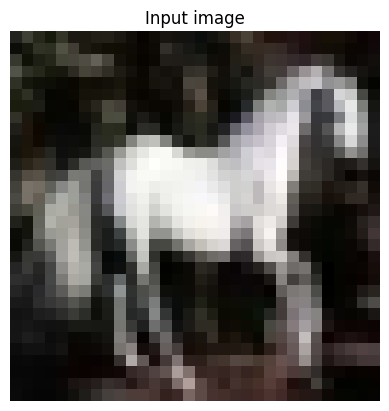
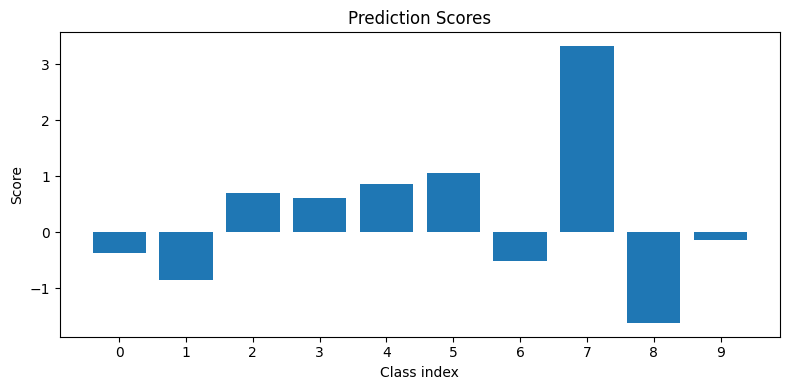
h.prepare() returns ds, which provides simultaneous access to all requested datasets. Below we define helper functions to display a CIFAR-10 image and plot per-class prediction scores, then access a sample to compare the original input data with the inference results.
[114]:
from matplotlib import pyplot as plt
import numpy as np


def show_image(image):
    """Display a CIFAR image"""
    image = image.transpose(1, 2, 0)
    min_val = np.min(image)
    max_val = np.max(image)
    image = (image - min_val) / (max_val - min_val)
    plt.imshow(image)
    plt.title("Input image")
    plt.axis("off")
    plt.show()


def show_bars(values):
    """Display a bar chart of predicted values."""
    plt.figure(figsize=(8, 4))
    plt.bar(range(len(values)), values)
    plt.xticks(range(len(values)))
    plt.xlabel("Class index")
    plt.ylabel("Score")
    plt.title("Prediction Scores")
    plt.tight_layout()
    plt.show()


index_of_interest = 13

print(f"Actual label: {ds['results'][index_of_interest]['input_data']['label']}")
print(f"Predicted label: {ds['results'][index_of_interest]['inference_results']['data'].argmax()}")
show_image(ds["results"][index_of_interest]["input_data"]["image"])
show_bars(ds["results"][index_of_interest]["inference_results"]["data"])
Actual label: 7
Predicted label: 7