Using reduce_dimensions to Visualize Inference Output#
Dimensionality-reduction algorithms can project high-dimensional data into a lower-dimensional space while preserving important structure in the data. This can make it easier to visualize and explore latent representations learned by machine learning models.
In this notebook, we will primarily use UMAP (Uniform Manifold Approximation and Projection), a dimensionality reduction algorithm that is particularly effective at preserving local relationships between data. This makes it ideal for visualizing the latent space learned by an unsupervised model.
Hyrax provides a reduce_dimensions verb for applying dimensionality reduction to inference outputs. Multiple algorithms are supported, including UMAP, t-SNE (T-distributed Stochastic Neighbor Embedding), and PCA (Principal Component Analysis). The desired algorithm can be selected
through the algorithm argument or configuration. Throughout most of this notebook we will use UMAP, then briefly demonstrate how the same workflow can be applied using other supported algorithms.
In this notebook we will:
Train a simple autoencoder on random data.
Run inference to obtain latent-space representations.
Apply
reduce_dimensionswith UMAP to produce a 2D embedding.Load and plot the reduced-dimensional output.
Show how to switch to 3D output.
Show how to load a previously saved UMAP model.
Show how to run the same workflow using t-SNE and PCA.
1. Setup#
Create a Hyrax instance and configure it to use the built-in HyraxAutoencoder model with the HyraxRandomDataset. The random dataset lets us run the full pipeline quickly without downloading real data.
[1]:
from hyrax import Hyrax
from hyrax.config_utils import find_most_recent_results_dir

h = Hyrax()
[2]:
# Use an autoencoder (unsupervised) so inference produces a latent vector.
h.set_config("model.name", "HyraxAutoencoder")

# Point at the random dataset — no download required.
data_request = {
    "train": {
        "data": {
            "dataset_class": "HyraxRandomDataset",
            "data_location": ".",
            "fields": ["image"],
            "primary_id_field": "object_id",
        },
    },
    "infer": {
        "data": {
            "dataset_class": "HyraxRandomDataset",
            "data_location": ".",
            "fields": ["image"],
            "primary_id_field": "object_id",
        },
    },
}
h.set_config("data_request", data_request)

# Train for just 1 epoch to keep things fast.
h.set_config("train.epochs", 1)
2. Train and Infer#
Train the autoencoder and then run inference to produce latent-space representations for every item in the dataset.
[ ]:
model = h.train()
inference_results = h.infer()
3. Run UMAP (2D)#
By default Hyrax reduces to 2 components (n_components = 2). Calling h.reduce_dimensions(algorithm="umap") fits a UMAP model on a sample of the inference output, then transforms the entire dataset. If the algorithm argument is omitted, reduce_dimensions uses the default algorithm specified in the configuration (UMAP by default).
[4]:
umap_results = h.reduce_dimensions(algorithm="umap")
[2026-08-11 14:17:49,305 hyrax.verbs.reduce_dimensions:INFO] Saving reduction results using umap to /Users/qiyuwang/Desktop/hyrax/docs/pre_executed/results/20260811-141749-umap-Ni76
[2026-08-11 14:17:49,306 hyrax.verbs.reduce_dimensions:INFO] Using most recent inference results dataset for dimensionality reduction.
[2026-08-11 14:17:49,381 hyrax.verbs.reduce_dimensions:INFO] No model_path specified. A new model will be fitted.
[2026-08-11 14:17:49,382 hyrax.verbs.reduction_algorithms.umap:INFO] Fitting the UMAP
[2026-08-11 14:17:52,775 hyrax.verbs.reduce_dimensions:INFO] Saving fitted umap reducer to result directory
[2026-08-11 14:17:53,962 hyrax.datasets.result_dataset:INFO] Optimizing Lance table after 1 batches
[2026-08-11 14:17:53,965 hyrax.datasets.result_dataset:INFO] Lance table optimization complete
[2026-08-11 14:17:53,965 hyrax.verbs.reduce_dimensions:INFO] Finished transforming all data with umap
h.reduce_dimensions() returns a ResultDataset that you can index directly. Each element is a NumPy array with shape (,n_components).
[5]:
import numpy as np

# Stack all UMAP embeddings into a single array.
umap_embeddings = np.array([umap_results[i] for i in range(len(umap_results))])
print(f"Shape: {umap_embeddings.shape}  (samples × components)")
Shape: (100, 2) (samples × components)
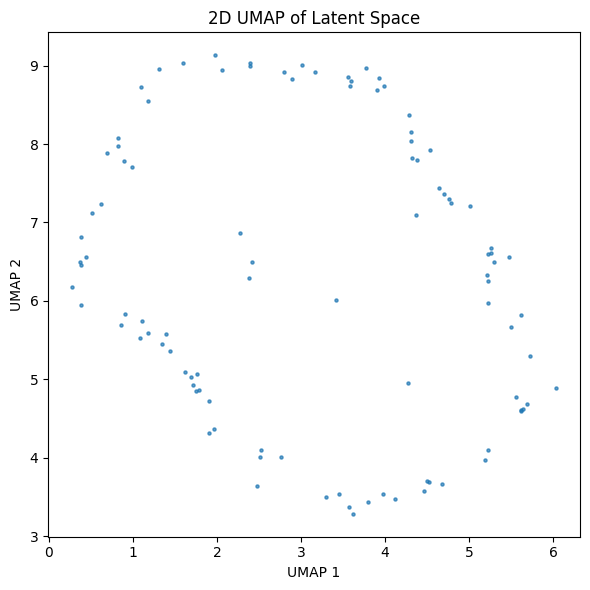
4. Plot the 2D Embedding#
A quick scatter plot of the two UMAP dimensions.
[6]:
import matplotlib.pyplot as plt

fig, ax = plt.subplots(figsize=(6, 6))
ax.scatter(umap_embeddings[:, 0], umap_embeddings[:, 1], s=5, alpha=0.7)
ax.set_xlabel("UMAP 1")
ax.set_ylabel("UMAP 2")
ax.set_title("2D UMAP of Latent Space")
plt.tight_layout()
plt.show()
5. Switch to 3D#
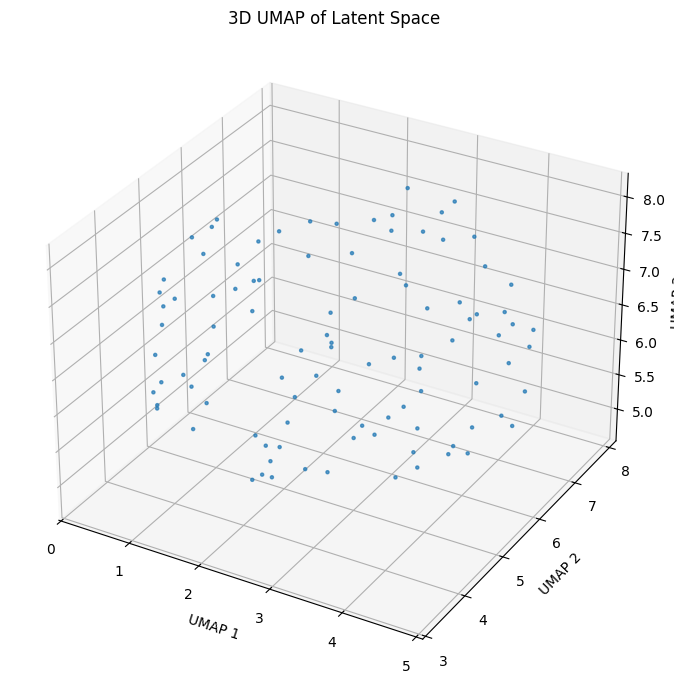
To produce a 3-dimensional embedding instead, set n_components to 3 before calling h.reduce_dimensions() again.
[7]:
h.set_config("reduce_dimensions.umap.kwargs.n_components", 3)
umap_results_3d = h.reduce_dimensions(algorithm="umap")

# save the path for loading the model
result_dir_3d = find_most_recent_results_dir(h.config, "umap")
[2026-08-11 14:17:54,247 hyrax.verbs.reduce_dimensions:INFO] Saving reduction results using umap to /Users/qiyuwang/Desktop/hyrax/docs/pre_executed/results/20260811-141754-umap-LjUW
[2026-08-11 14:17:54,248 hyrax.verbs.reduce_dimensions:INFO] Using most recent inference results dataset for dimensionality reduction.
[2026-08-11 14:17:54,278 hyrax.verbs.reduce_dimensions:INFO] No model_path specified. A new model will be fitted.
[2026-08-11 14:17:54,278 hyrax.verbs.reduction_algorithms.umap:INFO] Fitting the UMAP
[2026-08-11 14:17:54,336 hyrax.verbs.reduce_dimensions:INFO] Saving fitted umap reducer to result directory
[2026-08-11 14:17:54,544 hyrax.datasets.result_dataset:INFO] Optimizing Lance table after 1 batches
[2026-08-11 14:17:54,545 hyrax.datasets.result_dataset:INFO] Lance table optimization complete
[2026-08-11 14:17:54,545 hyrax.verbs.reduce_dimensions:INFO] Finished transforming all data with umap
[8]:
umap_embeddings_3d = np.array([umap_results_3d[i] for i in range(len(umap_results_3d))])
print(f"Shape: {umap_embeddings_3d.shape}  (samples × components)")

fig = plt.figure(figsize=(7, 7))
ax = fig.add_subplot(111, projection="3d")
ax.scatter(umap_embeddings_3d[:, 0], umap_embeddings_3d[:, 1], umap_embeddings_3d[:, 2], s=5, alpha=0.7)
ax.set_xlabel("UMAP 1")
ax.set_ylabel("UMAP 2")
ax.set_zlabel("UMAP 3")
ax.set_title("3D UMAP of Latent Space")
plt.tight_layout()
plt.show()
Shape: (100, 3) (samples × components)
6. Loading Previously Saved UMAP Model#
When running the reduce_dimensions verb with the UMAP algorithm, the fitted reducer can be saved to the results directory as ./umap.pickle if enabled in the configuration. We can reuse a previously trained UMAP reducer model to ensure consistent results and faster workflow.
To do this, pass the saved model path via the model_path argument:
[9]:
umap_results_load = h.reduce_dimensions(algorithm="umap", model_path=result_dir_3d / "umap.pickle")
[2026-08-11 14:17:54,633 hyrax.verbs.reduce_dimensions:INFO] Saving reduction results using umap to /Users/qiyuwang/Desktop/hyrax/docs/pre_executed/results/20260811-141754-umap-xKlK
[2026-08-11 14:17:54,633 hyrax.verbs.reduce_dimensions:INFO] Using most recent inference results dataset for dimensionality reduction.
[2026-08-11 14:17:54,662 hyrax.verbs.reduce_dimensions:INFO] Loading pre-existing reducer model from /Users/qiyuwang/Desktop/hyrax/docs/pre_executed/results/20260811-141754-umap-LjUW/umap.pickle
[2026-08-11 14:17:54,662 hyrax.verbs.reduction_algorithms.umap:INFO] Loading pre-existing UMAP model from /Users/qiyuwang/Desktop/hyrax/docs/pre_executed/results/20260811-141754-umap-LjUW/umap.pickle
[2026-08-11 14:17:54,856 hyrax.datasets.result_dataset:INFO] Optimizing Lance table after 1 batches
[2026-08-11 14:17:54,859 hyrax.datasets.result_dataset:INFO] Lance table optimization complete
[2026-08-11 14:17:54,859 hyrax.verbs.reduce_dimensions:INFO] Finished transforming all data with umap
The resulting shape should be the same as the 3D result.
[10]:
# Stack all UMAP embeddings into a single array.
umap_embeddings_3d_load = np.array([umap_results_load[i] for i in range(len(umap_results_load))])
print(f"Shape: {umap_embeddings_3d_load.shape}  (samples × components)")
Shape: (100, 3) (samples × components)
It is also possible to specify a model_path for UMAP model directly in the configuration. If it is set, running the reduce_dimensions verb will automatically load and use the previously saved reducer.
This allows us to reuse a saved model without passing the path explicitly each time.
[11]:
# set the model_path in config
h.set_config("reduce_dimensions.umap.model_path", str(result_dir_3d / "umap.pickle"))
umap_results_load_config = h.reduce_dimensions(algorithm="umap")

# Stack all UMAP embeddings into a single array.
umap_embeddings_3d_load_config = np.array(
    [umap_results_load_config[i] for i in range(len(umap_results_load_config))]
)
print(f"Shape: {umap_embeddings_3d_load_config.shape}  (samples × components)")
[2026-08-11 14:17:54,911 hyrax.verbs.reduce_dimensions:INFO] Saving reduction results using umap to /Users/qiyuwang/Desktop/hyrax/docs/pre_executed/results/20260811-141754-umap-BPAb
[2026-08-11 14:17:54,912 hyrax.verbs.reduce_dimensions:INFO] Using most recent inference results dataset for dimensionality reduction.
[2026-08-11 14:17:54,940 hyrax.verbs.reduce_dimensions:INFO] Loading pre-existing reducer model from /Users/qiyuwang/Desktop/hyrax/docs/pre_executed/results/20260811-141754-umap-LjUW/umap.pickle
[2026-08-11 14:17:54,941 hyrax.verbs.reduction_algorithms.umap:INFO] Loading pre-existing UMAP model from /Users/qiyuwang/Desktop/hyrax/docs/pre_executed/results/20260811-141754-umap-LjUW/umap.pickle
[2026-08-11 14:17:55,138 hyrax.datasets.result_dataset:INFO] Optimizing Lance table after 1 batches
[2026-08-11 14:17:55,140 hyrax.datasets.result_dataset:INFO] Lance table optimization complete
[2026-08-11 14:17:55,140 hyrax.verbs.reduce_dimensions:INFO] Finished transforming all data with umap
Shape: (100, 3) (samples × components)
Basic checks (e.g., file validity and dimensions compatibility) are handled automatically, but it is important to check that the provided model is meaningful for current dataset and task.
Note: This workflow is only available for dimensionality-reduction algorithms that first learn a tranformation and then apply that transformation to the entire dataset. UMAP and PCA support this pattern, allowing Hyrax to fit a reducer on a sample data and then transform the full dataset using the learned mapping. If enabled, the fitted model is saved in the results directory as ./<algorithm>.pickle. In contrast, t-SNE directly optimizes the low-dimensional positions of the data points rather than learning a reusable mapping. Because of this, it’s not appicable to save and reuse a t-SNE reducer for new data.
7. Using Other Reduction Algorithm#
The same reduce_dimensions workflow can be applied to other supported algorithms by simply changing the algorithm argument, i.e. h.reduce_dimensions(algorithm="<name>"). Currently, reduce_dimensions supports two additinal dimensionality-reduction algorithms: pca and tsne.
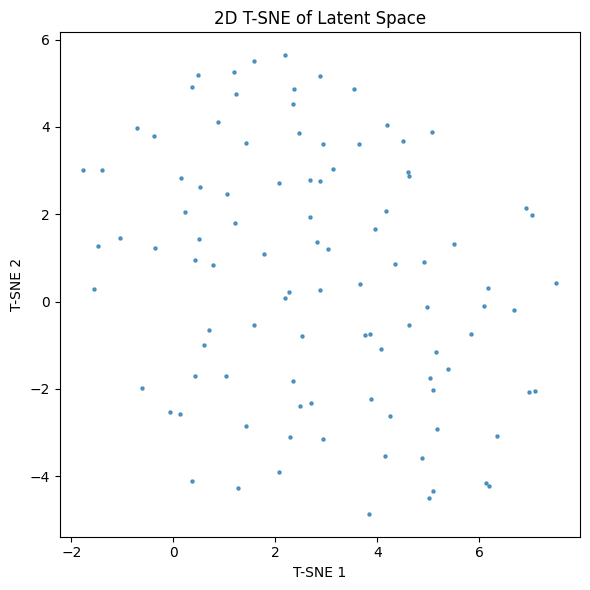
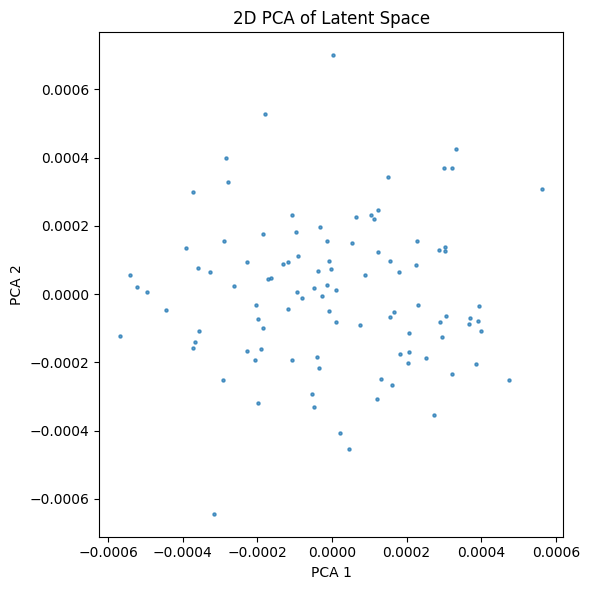
2D results with other reduction algorithms for the random dataset are as follow:
[12]:
tsne_results = h.reduce_dimensions(algorithm="tsne")
[2026-08-11 14:17:55,177 hyrax.verbs.reduce_dimensions:INFO] Saving reduction results using tsne to /Users/qiyuwang/Desktop/hyrax/docs/pre_executed/results/20260811-141755-tsne-27kL
[2026-08-11 14:17:55,178 hyrax.verbs.reduce_dimensions:INFO] Using most recent inference results dataset for dimensionality reduction.
[2026-08-11 14:17:55,207 hyrax.verbs.reduce_dimensions:INFO] No model_path specified. A new model will be fitted.
[2026-08-11 14:17:55,207 hyrax.verbs.reduction_algorithms.tsne:WARNING] TSNE does not support a separate fitting stage. Skipping fit.
[2026-08-11 14:17:55,207 hyrax.verbs.reduce_dimensions:INFO] Saving fitted tsne reducer to result directory
[2026-08-11 14:17:55,208 hyrax.verbs.reduction_algorithms.tsne:WARNING] TSNE does not support saving the model. Skipping save_model.
[2026-08-11 14:17:55,605 hyrax.datasets.result_dataset:INFO] Optimizing Lance table after 1 batches
[2026-08-11 14:17:55,608 hyrax.datasets.result_dataset:INFO] Lance table optimization complete
[2026-08-11 14:17:55,608 hyrax.verbs.reduce_dimensions:INFO] Finished transforming all data with tsne
[13]:
# Stack all T-SNE embeddings into a single array.
tsne_embeddings = np.array([tsne_results[i] for i in range(len(tsne_results))])
print(f"Shape: {tsne_embeddings.shape}  (samples × components)")

fig, ax = plt.subplots(figsize=(6, 6))
ax.scatter(tsne_embeddings[:, 0], tsne_embeddings[:, 1], s=5, alpha=0.7)
ax.set_xlabel("T-SNE 1")
ax.set_ylabel("T-SNE 2")
ax.set_title("2D T-SNE of Latent Space")
plt.tight_layout()
plt.show()
Shape: (100, 2) (samples × components)
[14]:
pca_results = h.reduce_dimensions(algorithm="pca")
[2026-08-11 14:17:55,701 hyrax.verbs.reduce_dimensions:INFO] Saving reduction results using pca to /Users/qiyuwang/Desktop/hyrax/docs/pre_executed/results/20260811-141755-pca-Iuln
[2026-08-11 14:17:55,702 hyrax.verbs.reduce_dimensions:INFO] Using most recent inference results dataset for dimensionality reduction.
[2026-08-11 14:17:55,743 hyrax.verbs.reduce_dimensions:INFO] No model_path specified. A new model will be fitted.
[2026-08-11 14:17:55,744 hyrax.verbs.reduction_algorithms.pca:INFO] Fitting the PCA
[2026-08-11 14:17:55,745 hyrax.verbs.reduce_dimensions:INFO] Saving fitted pca reducer to result directory
[2026-08-11 14:17:55,935 hyrax.datasets.result_dataset:INFO] Optimizing Lance table after 1 batches
[2026-08-11 14:17:55,937 hyrax.datasets.result_dataset:INFO] Lance table optimization complete
[2026-08-11 14:17:55,937 hyrax.verbs.reduce_dimensions:INFO] Finished transforming all data with pca
[15]:
# Stack all PCA embeddings into a single array.
pca_embeddings = np.array([pca_results[i] for i in range(len(pca_results))])
print(f"Shape: {pca_embeddings.shape}  (samples × components)")

fig, ax = plt.subplots(figsize=(6, 6))
ax.scatter(pca_embeddings[:, 0], pca_embeddings[:, 1], s=5, alpha=0.7)
ax.set_xlabel("PCA 1")
ax.set_ylabel("PCA 2")
ax.set_title("2D PCA of Latent Space")
plt.tight_layout()
plt.show()
Shape: (100, 2) (samples × components)
Key Configuration Options#
All reduce_dimensions settings live under the [reduce_dimensions] section of the Hyrax config. The most ocmmonly adjusted parameters are:
Global settings#
Config key |
Default |
Description |
|---|---|---|
|
“umap” |
Name of the reduction algorithm to use. |
|
true |
Save the fitted reducer model. |
|
false |
Use multiprocessing during the transform step. |
Algorithm-specific configuration#
Each algorithm has its own sub-section under [reduce_dimensions.<algorithm>].
UMAP#
Config key |
Default |
Description |
|---|---|---|
|
2 |
Number of output dimensions (2 or 3). |
|
15 |
Balances local vs. global structure. |
|
1024 |
Number of points used to fit the UMAP model. |
|
false |
Path to a previously saved UMAP reducer model. |
See the UMAP documentation for the full list of parameters you can pass under reduce_dimensions.umap.kwargs.
t-SNE#
Config key |
Default |
Description |
|---|---|---|
|
2 |
Number of output dimensions (2 or 3). |
|
30.0 |
Number of nearest neighbors considered. |
See the TSNE documentation for the full list of parameters you can pass under reduce_dimensions.tsne.kwargs.
PCA#
Config key |
Default |
Description |
|---|---|---|
|
2 |
Number of output dimensions (2 or 3). |
|
1024 |
Number of points used to fit the PCA model. |
|
false |
Path to a previously saved PCA reducer model. |
See the PCA documentation for the full list of parameters you can pass under reduce_dimensions.pca.kwargs.